The Magic Repo: Make Me Look Like a Champion
A complete course for developers who are serious about making AI part of how they actually work.
GitHub has a magic repo: make one with the same name as your account, put a README in it, and it shows at the top of your profile. Scott Hanselman's is terse bullet points, which is fine, he's Scott Hanselman. You and I might want a little more flair, and now we have the material for it. The aboutme.md from the interview lives in a local folder, Claude Desktop can see that folder, and it has my terminal, where the GitHub CLI is installed and authenticated. That last part is the lever: I'd rather give Claude gh than connect it to GitHub online, because the CLI is more capable and the blast radius if someone got into my Claude account is a lot smaller.
Before the big ask I check the context meter. We've burned a lot of tokens on markdown in this session, and the more words in the window, the harder it is for the model to distill the answer you actually want. We're fine, so I keep going, and I keep going with Fable 5.1 rather than dropping to Opus, because I want something that looks and smells like creative inspiration, not a bullet list. I dictated this, and you should dictate your own:
I want to create a GitHub profile page using this aboutme.md document together with my more popular repositories up on GitHub. So what I need you to do right now is to go ahead and make that repository, do whatever you need to do to make that profile landing area at the top of my profile page. But I also want a cool graphic to go along with it. I'm not sure what would work best. Something that reflects me, I suppose. I live in Hawaii, I like to surf, and I like working with AI. So I don't know, suggest something, make me a cool graphic and set me up a fun landing page. If you have any questions, ask them first. I'd rather have you ask me than just assume and do something.
Then, because it's Fable, I push it:
In fact, let's go a little farther than most people go and think of something that could go on my profile page that's not obnoxious, but actually looks incredible. I want my links in there, of course, so people can find me. But let's add something really interesting. Amaze me, blow my mind, do something powerful and fun.
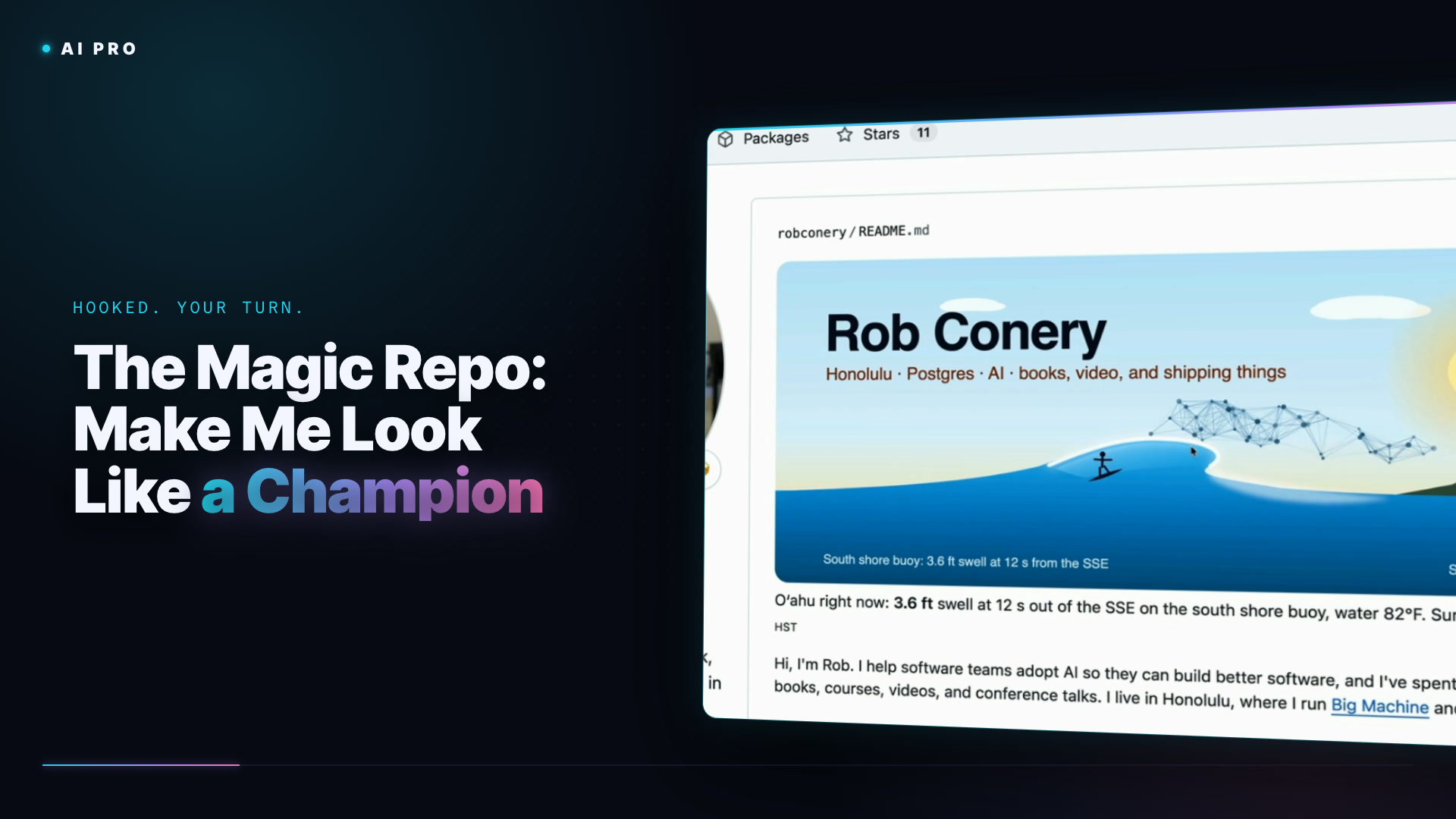
What comes back is the part I love. Before building anything it checks my setup over gh: my bio and website fields are stale, my top-starred repos are split between my account and orgs like SubSonic (where Frans runs Massive these days), and a profile README can't run JavaScript but can use animated SVGs refreshed on a schedule by GitHub Actions. Then it asks: a live wave at Honolulu dusk for the banner, a daily surf and sunset line, latest Big Machine video from YouTube, a geeky Easter egg, current plus greatest-hits repos, and a bio update. Yes to all of it.
The first pass is a fun first pass. The surfer is cute, the buoy report is neat, and there's a blob that is apparently a cloud. Claude is not known for its design skills, and the fix it says it made is hiding behind GitHub's README caching. What matters is the copy underneath: straight away it tells people who I am, where to find me, what I'm building, and a greatest hits of the work that mattered most. The graphic we deal with in the next lesson.
A complete course for developers who are serious about making AI part of how they actually work.